10 Exception handling best practices in C#

Writing software is a complex task, and it's quite common to see applications crash due to bad code, bad user input, unavailable resources or unexpected conditions at runtime, and so on. And when this happens, we say an exception has occurred that caused the app to crash.
An exception is a runtime error in a program that violates a system or application constraint, or a condition that is not expected to occur during the normal execution of the program.
A well-designed app must handle exceptions and prevent the app from crashing. This article describes some of the best practices to follow while handling exceptions in C#.
- Use
throwinstead ofthrow ex. - Log the exception object while logging exceptions.
- Avoid catch block that just rethrows it.
- Do not swallow the exception.
- Throw exceptions instead of returning an error code.
- Common failure conditions should be handled without throwing exceptions.
- Use grammatically correct and meaningful error messages.
ApplicationExceptionshould never be thrown from code.- Use the predefined exception types.
- End custom exception class names with the word
Exception.
1. Use throw instead of throw ex
Using throw ex inside a catch block does not preserve the stack trace and the original offender would be lost. Instead use throw as it preserves the stack track and the original offender would be available.
// Bad code
catch(Exception ex)
{
    throw ex; // Stack trace will show this line as the original offender.
}
// Good code
catch(Exception ex)
{
    throw; // The original offender would be rightly pointed.
}
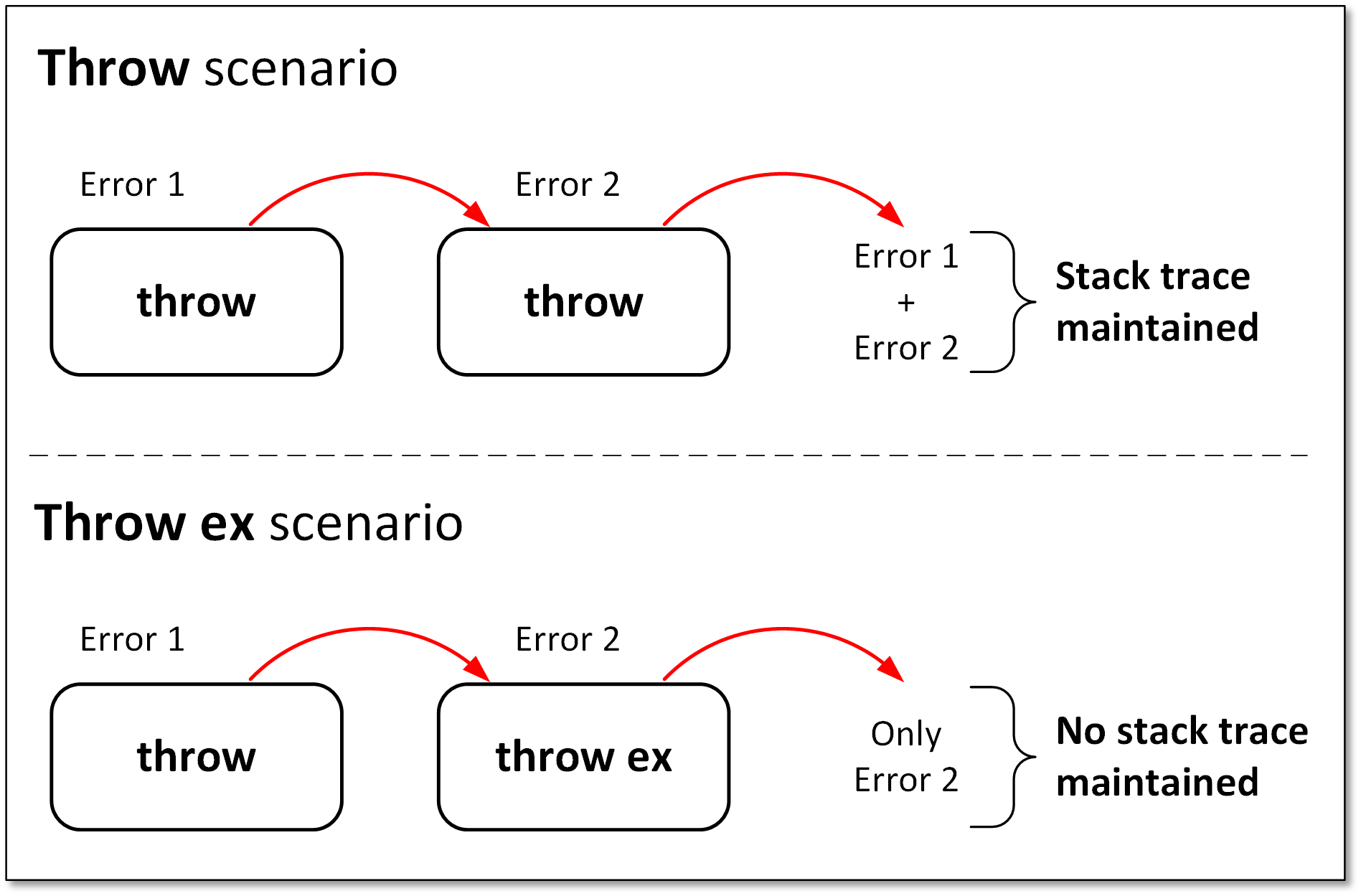
Read more about this on my blog - Exception handling in C# - throw or throw ex
2. Log the exception object while logging exceptions
Often developers log just the exception message to the logging system without the exception object. The exception object contains crucial information such as exception type, stack trace, etc. and it's very important to log it.
If you are using the ILogger, there are extension methods to LogError, LogCritical, Log, etc that accepts exception object as a parameter; use those instead of just the message ones.
LogCritical(Exception exception, string message, params object[] args)
LogError(Exception exception, string message, params object[] args)
Log(LogLevel logLevel, Exception exception, string message, params object[] args)
// Bad code
catch (DivideByZeroException ex)
{
    // The exception object ex is not logged, thus crucial info is lost
    this.logger.LogError("Divide By Zero Exception occurred");
}
In the above example, the exception object ex is not logged resulting in loss of stack trace.
// Good code
catch (DivideByZeroException ex)
{
    this.logger.LogError(ex, "Divide By Zero Exception occurred");
}
3. Avoid catch block that just rethrows it
Don't simply catch an exception and just re-throw it. If the catch block has no other purpose, remove the try-catch block and let the calling function catch the exception and do something with it.
// Bad code
public void Method1() {
    try {
        Method2();
    }
    catch (Exception ex) {
        // Code to handle the exception
        // Log the exception
        this.logger.LogError(ex);
        throw;
    }
}

public void Method2() {
    try {
        // Code that will throw exception
    }
    catch (Exception) {
        throw;
    }
}
In the above example, Method1 is calling Method2 and there is a possibility of an exception occurring in Method2. The catch block in Method2 does nothing with the exception and just re-throws it.
Instead, the try-catch block in Method2 can be removed and the caller which is Method1 in this case can catch the exception and handle it.
// Good code
public void Method1()
{
    try
    {
        Method2();
    }
    catch (Exception ex) {
        // Code to handle the exception
        // Log the exception
        this.logger.LogError(ex);
        throw;
    }
}

public void Method2()
{
    // Code that will throw exception

    // No try-catch block here
    // as this method doesn't know how to handle the exception
}
4. Do not swallow the exception
One of the worst things to do in exception handling is swallowing the exception without doing anything. If the exception is swallowed without even logging there won't be any trace of the issue that occurred. If you are not sure of what to do with the exception, don't catch it or at least re-throw it.
// Bad code
try
{
    // Code that will throw exception
}
catch (Exception ex)
{
}
5. Throw exceptions instead of returning an error code
Sometimes instead of throwing exceptions developers return error codes to the calling function, this might lead to exceptions going unnoticed as the calling functions might not always check for the return code.
// Bad code
public int Method2()
{
    try
    {
        // Code that might throw exception
    }
    catch (Exception)
    {
        LogError(ex);
        // This is bad approach as the caller function
        // might miss to check the error code.
        return -1;
    }
}
6. Common failure conditions should be handled without throwing exceptions
For conditions that are likely to occur and trigger an exception, consider handling them in a way that will avoid the exception. Example -
- Close the connection only after checking if it's not already closed.
- Before opening a file, check if it exists using the
File.Exists(path)method. - Use fail-safe methods like -
CreateTableIfNotExistswhile dealing with databases and tables. - Before dividing, ensure the divisor is not 0.
- Check
nullbefore assigning value inside a null object. - While dealing with parsing, consider using the
TryParsemethods.
// Bad code
int.Parse(input);

// Good code
int.TryParse(input, out int output);
7. Use grammatically correct and meaningful error messages
Ensure that the error messages are clear and end with a period. The exception message should not be abrupt and open-ended. Clear and meaningful messages give the developer a good idea of what the issue could have been while trying to replicate and fix the issue.
// Bad code
catch (FileNotFoundException ex)
{
    this.logger.LogError(ex, "Something went wrong");
}
// Good code
catch (FileNotFoundException ex)
{
    this.logger.LogError(ex, "Could not find the requested file.");
}
8. ApplicationException should never be thrown from code
In the initial design of .NET, it was planned that the framework will throw SystemException while user applications will throw ApplicationException. However, a lot of exception classes didn't follow this pattern and the ApplicationException class lost all the meaning, and in practice, this found to add no significant value.
Hence it's advised that you should not throw an ApplicationException from your code and you should not catch an ApplicationException too unless you intend to re-throw the original exception. Also custom exceptions should not be derived from ApplicationException.
9. Use the predefined exception types
There are many exceptions already predefined in .NET. Some of them being:
DivideByZeroExceptionis thrown if the divisor is 0.ArgumentException,ArgumentNullException, orArgumentOutOfRangeExceptionis thrown if invalid parameters are passed.InvalidOperationExceptionis thrown if a method call or property set is not appropriate in the object's current state.FileNotFoundExceptionis thrown if the file is not present.IndexOutOfRangeExceptionis thrown if the item being accessed from an array/collection is outside its bounds.
The predefined exceptions are sufficient in most of the cases. Hence introduce a new custom exception class only when a predefined one doesn't apply or you would like to have some additional business analytics based on some custom exception, e.g. A custom exception - TransferFundsException can be used to keep track of fund transfer exceptions and generate business analytics & insights from it.
10. End custom exception class names with the word Exception
As mentioned earlier, the predefined exception types are sufficient in most of the cases, but when a custom exception is necessary, name it appropriately and end the exception name with the word "Exception".
Also, ensure that the custom exception derives from the Exception class and includes at least the three common constructors :
- Parameterless constructor
- Constructor that takes a string message
- Constructor that takes a string message and an inner exception
Example:
using System;

public class TransferFundsException : Exception
{
    public TransferFundsException()
    {
    }

    public TransferFundsException(string message)
        : base(message)
    {
    }

    public TransferFundsException(string message, Exception inner)
        : base(message, inner)
    {
    }
}
Final Thoughts
These are some of the exception handling practices that I use and find very helpful in my day-to-day work. Some of the above ones might look obvious, but often go unnoticed by many. Let me know your thoughts and do mention any other exception handling practices that you follow.
About the author
I'm a software consultant who loves to build projects and share my learnings on this blog.
Comments
Join the discussionNice article. Thank you.