# Exception handling in C# - throw or throw ex
## What are Exceptions?
An exception is a runtime error in a program that violates a system or application constraint, or a condition that is not expected to occur during the normal execution of the program.
Exceptions occur due to bad user input or bad code, unexpected conditions at runtime, unavailable resources, and so on. For example, attempting to read a file that doesn't exist, trying to divide a number by zero, attempting to insert data to a table that doesn't exist, etc. will all throw exceptions. When exceptions are not handled properly, it leads to the crashing of the application!
## Handling Exceptions
Handling exceptions ensures that our application does not crash, also it gives us a chance to exit gracefully with some meaningful message or in some scenarios a second chance to fix the issue.
C# provides built-in support to handle the exception using `try`, `catch` & `finally` blocks.
```csharp
try
{
// Code to try goes here.
}
catch (SomeSpecificException ex)
{
// Code to handle the exception goes here.
}
finally
{
// Code to execute after the try (and possibly catch) block goes here.
}
```
After an exception is thrown, the runtime checks the current statement to see whether it is within a `try` block. If it is, any `catch` blocks associated with the `try` block are checked to see whether they can catch the exception. `Catch` blocks typically specify exception types; if the type of the `catch` block is the same type as the exception or a base class of the exception, the `catch` block can handle the method.
If the statement that throws an exception isn't within a `try` block or if the `try` block that encloses it has no matching `catch` block, the runtime checks the calling method for a `try` statement and `catch` blocks. The runtime continues up the calling stack, searching for a compatible `catch` block. After the catch block is found and executed, control is passed to the next statement after that `catch` block.
One of the crucial best practices in exception handling is to ensure that the exception is not swallowed, rather it should bubble up to the caller or the topmost part of your application so that the entire stack trace is maintained.
## Difference between `throw` and `throw ex`
So what's the fuss here? Exception handling seems simple right?
Well, many times developers often use `throw;` or `throw ex;` interchangeably inside the catch block, and that's where the main difference occurs.
To better understand the difference let's take an example of a simple Calculator Application that implements just division for now.
```csharp
using System;
namespace CalculatorApp
{
class Program
{
static void Main(string[] args)
{
Console.WriteLine("Enter the dividend");
int.TryParse(Console.ReadLine(), out int dividend);
Console.WriteLine("Enter the divisor");
int.TryParse(Console.ReadLine(), out int divisor);
Console.WriteLine(Divide(dividend, divisor));
}
static int Divide(int dividend, int divisor)
{
try
{
return dividend / divisor;
}
catch (DivideByZeroException ex)
{
Console.WriteLine("Cannot divide by 0");
throw; //Re-throw the error
}
}
}
}
```
Here, we have the `Divide` method which does the division of inputted numbers and is called from the `Main` function. When a number is divided by 0, it throws the `DivideByZeroException` and in our code, we catch this exception and log it to the console.
Now let's look at the stack trace being printed with just `throw;` statement from the catch block when a divide by zero exception occurs:
```csharp
catch (DivideByZeroException ex)
{
Console.WriteLine("Cannot divide by 0");
throw; //Re-throw the error
}
```
```text
Unhandled exception. System.DivideByZeroException: Attempted to divide by zero.
at CalculatorApp.Program.Divide(Int32 dividend, Int32 divisor) in C:\Blog\CalculatorApp\Program.cs:line 22
at CalculatorApp.Program.Main(String[] args) in C:\Blog\CalculatorApp\Program.cs:line 15
```
From the stack trace we see the **exact method** and **line number** where the exception occurred, in this case, line number **22** of the `Divide` function in `Program` class.
`throw;` propagated the error while preserving the information on **where exactly it occurred**.
Now let's change the catch block to throw the caught exception object - `throw ex` and analyze the stack trace being printed.
```csharp
catch (DivideByZeroException ex)
{
Console.WriteLine("Cannot divide by 0");
throw ex; //throwing the caught exception object
}
```
```text
Unhandled exception. System.DivideByZeroException: Attempted to divide by zero.
at CalculatorApp.Program.Divide(Int32 dividend, Int32 divisor) in C:\Blog\CalculatorApp\Program.cs:line 27
at CalculatorApp.Program.Main(String[] args) in C:\Blog\CalculatorApp\Program.cs:line 15
```
You can see that the stack trace points to line number **27** as the cause of the exception, but in fact, it's the line where the **exception was thrown** and **not where it occurred**. We missed the crucial information of where the exception exactly occurred.
## `throw` or `throw ex` : The Conclusion
Handling exceptions is a crucial part of software development. It's necessary to understand the basics and the implication of using different `throw` statements. Developers often spend hours debugging an issue just because they don't have the right stack trace to point the line where the exception exactly occurred due to the way exception was thrown.
**In simple terms:**
`throw` *preserves *the stack trace (the original offender would be available)
`throw ex` *does not preserve* the stack trace (the original offender would be lost)
The stack trace loss is very evident when the exceptions bubble up the call stack. Use of `throw ex` will lead to loss of crucial stack trace.
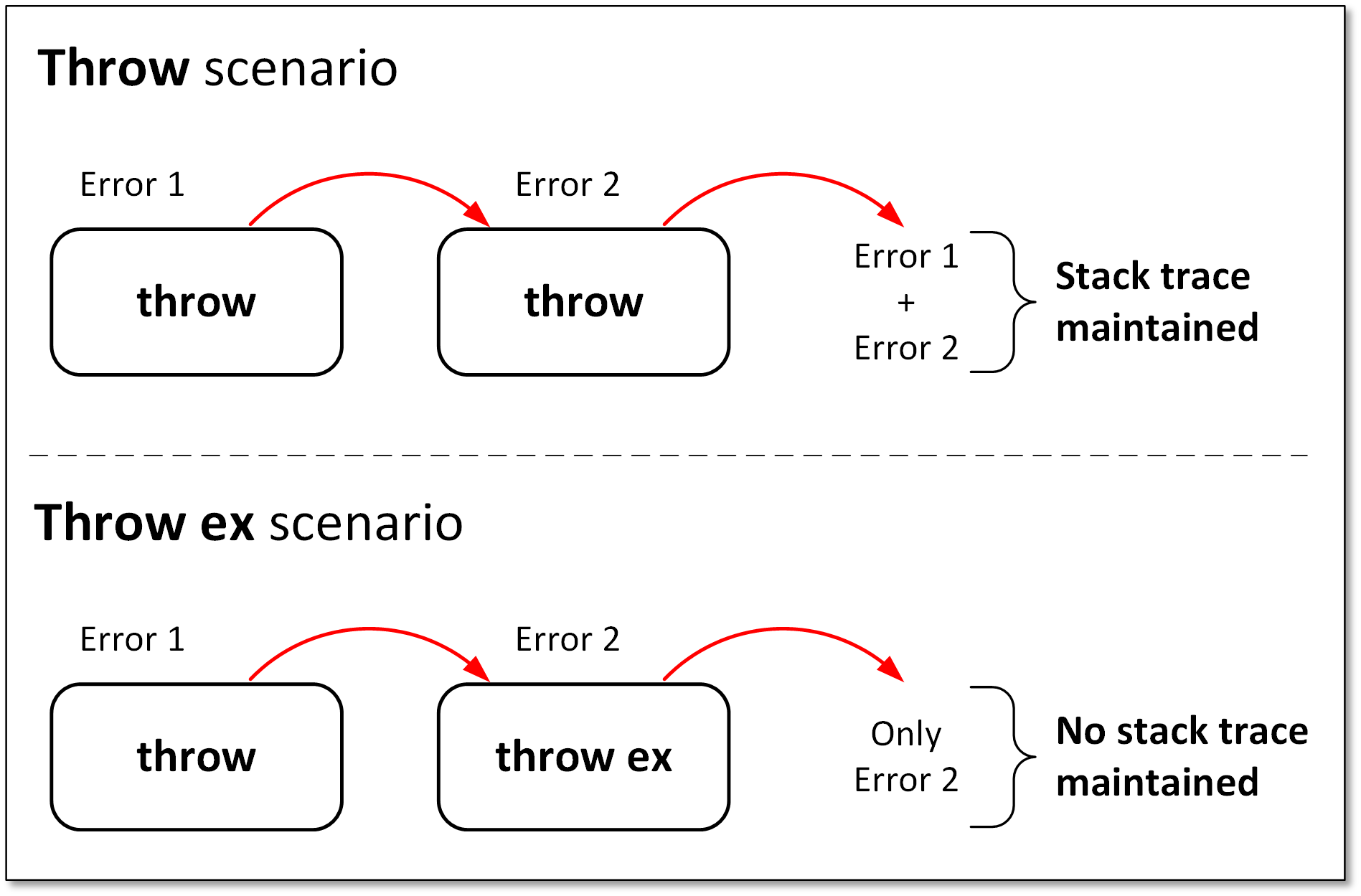
To conclude, always ensure that you **re-throw an exception** - that is simply calling **throw without an exception object**.